Google Shopping vs PMax for Shopify: when each wins
 By Dror Aharon
·
CEO, COREPPC
·
Updated April 17, 2026
·
11 min read
By Dror Aharon
·
CEO, COREPPC
·
Updated April 17, 2026
·
11 min read
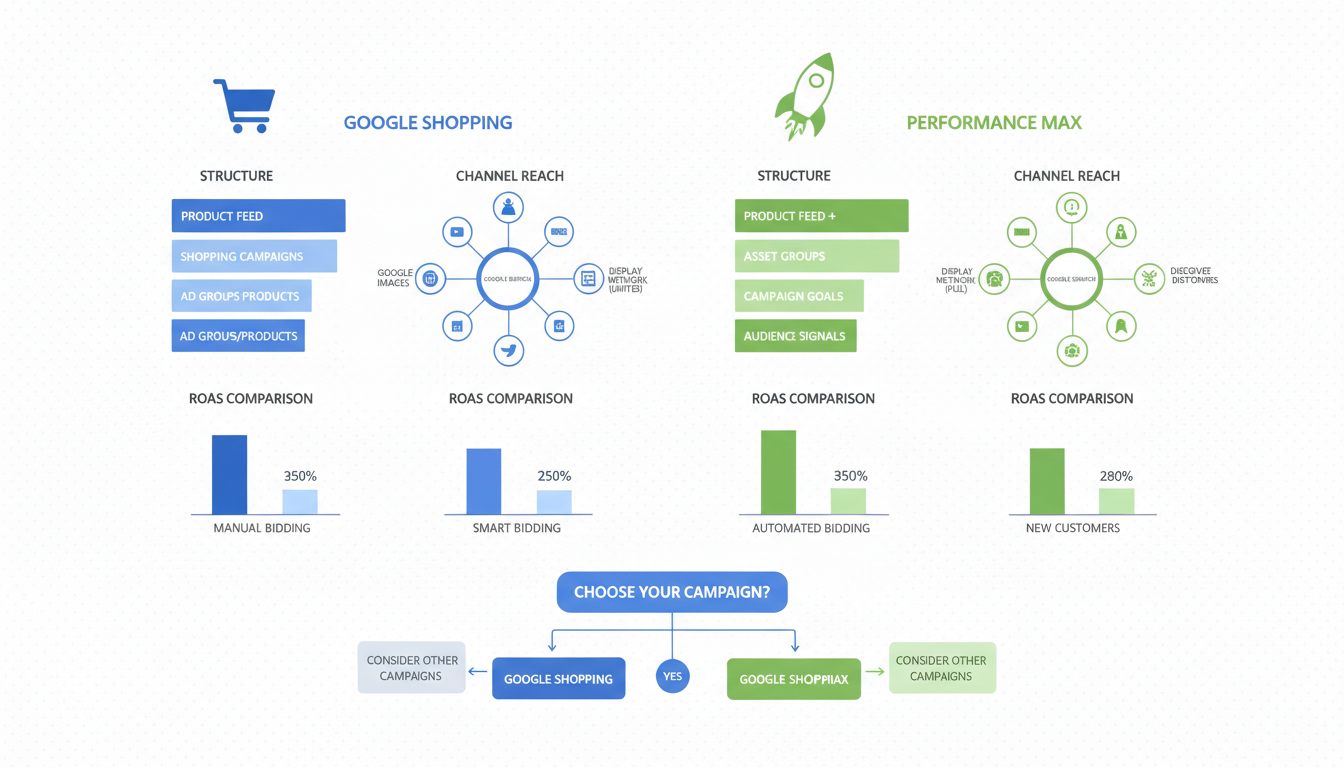
Shopify Google Shopping vs PMax is the wrong question framed as a binary, and that framing is what burns most growth-stage Shopify budgets. The right question is which campaign type owns which inventory, at which revenue tier, with which feed score. Below $5k a month in Google spend, Standard Shopping wins almost every time because PMax's learning phase eats the budget before the algorithm finds signal. Above $30k a month with a feed score of 140+ on the 14-attribute scorecard, PMax outperforms Standard Shopping by around 20% on ROAS in our audit data. The middle, $5k to $30k, is where most Shopify stores live and where the decision actually matters. Run the wrong one and you bleed 25 to 40% of budget to cannibalization or a learning phase that never closes. Run the right mix and the same dollars produce 2x the conversions inside six weeks.
- Standard Shopping wins below $5k spend, low feed scores, and tight margin categories.
- PMax wins above $30k spend, feed score 140+, strong creative, and clear margin tiers.
- Run both in parallel between $5k and $30k, with the campaign hierarchy toggle set right.
- Feed quality decides the winner more than budget. Below feed score 100, PMax loses.
The real difference between Standard Shopping and PMax in 2026
Standard Shopping and PMax both run on the Merchant Center feed, both serve product cards on Google search results, and both let Smart Bidding chase target ROAS or conversion volume. From the outside they look like cousins. They are not. The differences underneath are what decide which one drains a budget and which one scales it.
Standard Shopping serves only on Google search results pages, the Shopping tab, image search, and Google's partner shopping sites. You see the actual search queries that triggered each click. You can add negative keywords at the campaign level. You can split product groups by category, brand, or custom label and bid each one separately. The control is high. The reach is narrow.
PMax serves the same Shopping inventory plus YouTube, Display, Gmail, and Discover, all from one campaign. You do not see search queries. You cannot bid by product group inside an asset group. You can only add negative keywords through an account-level submission form, capped at 100 entries. The control is low. The reach is broad, often to a fault. About 30 to 40% of PMax spend on a fresh campaign goes to YouTube and Display placements that produce almost no attributable revenue at small budgets, which is why PMax burns cash hard during the first 14 days of a campaign that is not feed-ready.
What changed in 2026 is that Google finally exposed channel-level performance inside PMax, so you can see what share of spend is going to Shopping vs YouTube vs Display. That is the single most useful PMax update in two years. Before it, you were betting blind. Now you can rein in YouTube waste with placement exclusions. Standard Shopping never had this problem because it never served on YouTube in the first place. Google's Standard Shopping help center is the official starting point for the older campaign type. PMax docs live in a different help section entirely, which is itself a hint about how Google sees the two products: Standard Shopping is mature and stable, PMax is still being shaped.
The short version: Standard Shopping is a precision tool. PMax is a volume tool. The question of standard shopping or pmax shopify campaigns is about which one fits the stage your store is in.
When Standard Shopping wins: 3 operator scenarios
Standard Shopping is the right call more often than the PMax marketing makes it sound. Three scenarios where Standard Shopping wins outright in our audit sample:
Scenario 1: Spend under $5k a month, fewer than 30 SKUs. Below this threshold, PMax cannot exit learning phase reliably. Google's official guidance says 50 conversions for Smart Bidding to optimize, but in our audit data PMax stabilizes around 30. A store doing $3k a month at a $25 CPA hits 30 conversions in 25 days, but PMax restarts learning every time you nudge budget more than 20% in a week, which most stores do as they figure out the campaign. Standard Shopping does not have a learning phase the same way. You launch, you see queries within 48 hours, you add negatives, you hit profitable CPA inside two weeks. PMax in the same scenario takes 6 to 8 weeks to stabilize, if it ever does.
Scenario 2: Tight margin category (under 30% gross margin), brand sensitive. Furniture, electronics resale, supplements, and most apparel sit here. Margin under 30% means CPA tolerance is brutal, and PMax's broad reach at low control is a liability. PMax will happily spend $40 to acquire a customer worth $25 in gross profit because it cannot see margin, only conversion volume. Standard Shopping lets you bid each product group by margin tier, exclude low-margin SKUs, and cap CPC on category terms. Operators in tight-margin verticals consistently report Standard Shopping CPAs 30 to 40% lower than PMax for the same product set. The visibility tradeoff is worth it when every dollar of CPA matters.
Scenario 3: New product launch, learning what queries convert. When you launch a new product line you do not know which search terms will convert and which will burn budget. PMax hides this from you by design. Standard Shopping shows you in the Search Terms report. Run Standard Shopping for the first 4 to 6 weeks of a new product launch, mine the queries, build a negative list, identify the converting modifiers, then decide whether to graduate to PMax or keep the SKUs in Standard Shopping permanently. Skipping this step and launching new products straight into PMax is one of the most expensive mistakes we see in audits. You learn nothing about the queries, the algorithm learns badly because the feed for new products is usually thin, and the campaign burns 4 to 6 weeks of budget before you realize it never had a chance.
When PMax wins: 3 operator scenarios
PMax earns its place when the conditions actually fit, which is less often than the platform reporting suggests but more often than Standard Shopping purists admit. Three scenarios:
Scenario 1: Spend above $30k a month, feed score 140+ on the 14-attribute scorecard. This is the sweet spot PMax was designed for. At this spend level there are enough conversions to feed the algorithm without restarts, the feed quality means Google's automated decisions are based on good signal, and the broader reach across YouTube and Display starts producing incremental revenue instead of pure waste. CPAs come in 15 to 25% lower than Standard Shopping at the same spend, and ROAS lands 20 to 30% higher in our audit data. The channel-level visibility added in 2026 Q1 means YouTube waste can be controlled with placement exclusions instead of fought blind. PMax at this stage is a scale amplifier, not a gamble.
Scenario 2: Catalog with 200+ SKUs across 5+ categories, mixed margin tiers. Standard Shopping at this scale becomes operationally painful. Managing product groups, bid adjustments, and negative keywords across 200 SKUs eats a media buyer's week without producing proportional gains. PMax handles the cross-category routing automatically, and asset group segmentation by margin tier gives you most of the control you would get from Standard Shopping product groups, with 20% of the manual work. The tradeoff is real (you lose query visibility) but it is the right one at this catalog size. Stores in this profile that stay on pure Standard Shopping past $40k a month usually plateau because the operational ceiling beats the ROAS gains.
Scenario 3: Strong creative bench, brand with imagery and video. PMax serves on YouTube and Display, which means images and video matter. Standard Shopping serves only product cards from the feed image. If your store has 15+ lifestyle images, 5+ short videos, and headline copy that performs in social, PMax converts that creative into incremental revenue across placements Standard Shopping cannot reach. If your store has only product photography on white backgrounds and no video, the YouTube and Display placements in PMax produce almost no revenue, and the campaign degrades to a more expensive Standard Shopping clone. Creative quality is the multiplier that decides whether the broader reach pays for itself.
Running both in parallel: the campaign hierarchy toggle
The shopping vs pmax shopify decision flips when you stop framing it as either-or. Between $5k and $30k a month in spend, running both is usually the right call. The trick is making sure they do not fight each other in the auction.
Google's default behavior when both PMax and Standard Shopping target the same product is that PMax wins. This is documented as the "Performance Max campaigns will be prioritized" rule and it applies automatically, no toggle needed, unless you explicitly change it. The result if you ignore it: you launch Standard Shopping for query visibility on a subset of products, PMax also covers those products in its asset groups, PMax wins the auction every time, your Standard Shopping campaign starves to zero impressions, and you get neither query visibility nor PMax volume scaling efficiently because the budget pools overlap.
The fix is feed segmentation. Use a custom_label_3 value (or any custom label tier you have not used for margin) to flag SKUs as "pmax_only" or "standard_shopping_only". In PMax, set the asset group product filter to include only "pmax_only". In Standard Shopping, set the inventory filter to include only "standard_shopping_only". The two campaigns now run on completely separate inventory. No auction overlap, no cannibalization, two different optimization signals working in parallel.
A clean shopify pmax shopping split for a $15k a month store usually looks like this:
- PMax on the top 30% of SKUs by revenue contribution. 70% of the budget. These are the proven high-volume products that benefit from PMax's broad reach.
- Standard Shopping on the next 40% of SKUs (the long tail with some volume). 25% of the budget. Use this campaign to mine queries, add negatives, identify the next products that should graduate to PMax.
- Excluded from both: the bottom 30% of SKUs (low-volume, low-margin, or both). 5% of remaining budget held for testing.
The Standard Shopping campaign is doing intelligence work as much as conversion work. Every two weeks, review the Search Terms report, identify products generating consistent converting queries, and graduate them to the PMax campaign by switching their custom label from "standard_shopping_only" to "pmax_only". The feed sync handles the swap automatically inside 24 hours.
The cannibalization math: how PMax steals from Search and Shopping
The least-discussed problem with running PMax is that it cannibalizes everything around it. Search brand, Search non-brand, Standard Shopping, even Display campaigns running on the same product set. The platform reporting does not flag any of this because PMax claims credit for whatever conversions happen, regardless of whether the same conversion would have happened through a cheaper campaign.
The math from a real audit last quarter: a Shopify store running $8k a month in Search brand campaigns at 8x ROAS launched PMax. Six weeks later, branded Search impression share had dropped 31% and PMax had absorbed those branded queries into its reporting. Branded queries through PMax came in at $1.80 average CPC instead of $0.65 in the dedicated Search campaign. Total branded revenue stayed flat. Blended account ROAS dropped 22% because the same revenue now cost more than twice as much to produce. The dashboards showed PMax outperforming Search brand. The bank account showed the opposite.
Three campaigns PMax cannibalizes by default, and the fixes:
-
Brand Search campaigns. PMax will bid on your own brand queries unless you add account-level brand exclusions before launch. The setting is at Google Ads > Admin > Account-level exclusions > Add brand list. Most operators never find this. Without it, branded queries leak into PMax at higher CPCs and report as PMax wins. Add the exclusion on day one of any PMax launch.
-
Standard Shopping on overlapping inventory. As covered in the previous section, PMax wins the auction by default when both target the same SKUs. The fix is feed segmentation by custom label.
-
Search non-brand on category terms. If you run Search campaigns on broad category keywords ("women's rain jackets") and PMax also finds those queries, PMax usually wins because it has more bidding flexibility. The Search campaign's impression share drops without obvious cause. The fix is to keep non-brand Search tightly scoped to exact match keywords with narrow ad groups, so it competes on different inventory than PMax targets through search themes.
The cannibalization math compounds every month it is ignored. A 22% blended ROAS drop on a $30k a month account is $6,600 a month of margin evaporated. Over six months that is $40k of margin lost to a campaign structure that looked clean on the surface. This is the single most expensive mistake we see in audits where PMax was launched without the cannibalization defenses in place.
Best to run an ngram analysis on the Search Terms report (still available for Search campaigns, blocked for PMax) the week after a PMax launch and again four weeks later. If branded impression share has dropped 15% or more, the cannibalization is happening and the brand exclusion is missing.
Feed quality threshold: the score below which PMax loses every time
Feed quality is the single biggest predictor of whether PMax beats Standard Shopping. Below a certain threshold, PMax loses every time, regardless of budget or category.
The threshold in our audit data: feed score 100 out of 170 on the 14-attribute scorecard. Score below 100 and PMax CPA runs 38% higher than Standard Shopping CPA on the same products. Score above 140 and PMax CPA runs 20% lower. The 40-point spread between those two scores is where the decision flips.
Why feed quality matters more for PMax than Standard Shopping: Standard Shopping serves only on shopping placements where the product card image and price do most of the conversion work. A weak title or missing custom label hurts but does not kill the campaign. PMax serves across YouTube, Display, and Discover where Google's automated systems generate ad copy and select audiences based on the feed signal. A weak feed means Google is making bad decisions in placements you cannot directly control. The result is impressions on irrelevant audiences, low-intent traffic, and CPAs that climb week over week as the algorithm learns from bad signal.
The 14 feed attributes that matter most, ranked:
- Title (front-loaded with brand, product type, key attributes, first 70 chars)
- Product type (3-5 levels deep from Shopify collections, not 1)
- Google product category (mapped to level 4-5 of Google's taxonomy)
- Image quality (1200x1200, white background, product isolated)
- GTIN (present and valid on 100% of SKUs)
- Brand (set explicitly, not pulled from empty vendor field)
- Description (500-1000 words, benefit-led, query-matched)
- Price + sale_price (sale price only when discount is over 5% and over 48 hours)
- Availability (real-time sync from Shopify)
- Condition (set even for new products)
- Color, size, material (structured attributes, not jammed in title)
- Custom labels 0 through 4 (margin tier, hero/best seller/long tail, seasonal, stock bucket, price band)
- Shipping (accurate by region, free shipping flagged)
- Product highlights (3-5 benefit bullets, underused by 80% of stores)
Score each attribute 0-10. Weight title, product type, and custom labels at 2x. Total possible: 170. The Merchant Center product data specification covers what is required vs optional, but "optional" in Google's docs means "required for competitive performance" in practice.
The pattern in our audit sample: 9 out of 10 Shopify stores running PMax score below 100. Those same stores almost universally underperform Standard Shopping at the same spend. They blame PMax. The PMax campaign was fine. The feed underneath it was the problem the entire time.
Budget split between PMax and Standard Shopping by revenue tier
The right budget split between PMax and Standard Shopping is not a fixed ratio. It moves with revenue tier, feed quality, and creative bench. The decision tree below covers the ranges we see win most often in our audit data.
Under $3k a month in Google spend: 100% Standard Shopping. PMax cannot stabilize at this spend level. Run Standard Shopping, mine queries, build the negative list, fix the feed. Revisit PMax when spend crosses $5k.
$3k to $5k a month, feed score 100-130: 80% Standard Shopping, 20% PMax test campaign. The PMax test runs on the top 5 SKUs by revenue contribution, segmented in the feed so it does not cannibalize Standard Shopping. The goal is to learn whether PMax can hold a CPA at this spend level before scaling. If the test holds CPA within 15% of Standard Shopping over 4 weeks, increase to 40% PMax. If it does not, kill the test and re-fix the feed.
$5k to $15k a month, feed score 120-140: 50% PMax, 40% Standard Shopping, 10% Search non-brand on category exact match. PMax handles the proven high-volume SKUs. Standard Shopping handles the long tail and runs intelligence on which SKUs to graduate to PMax next. Search non-brand picks up commercial-intent queries PMax misses.
$15k to $30k a month, feed score 140+: 65% PMax, 25% Standard Shopping, 10% Search (split between brand and non-brand). PMax now drives most of the volume. Standard Shopping is shrinking but still useful for query intelligence and long-tail coverage. Brand Search runs as defense layer with brand exclusions on PMax.
Above $30k a month, feed score 140+: 75% PMax across multiple asset groups segmented by margin, 15% Standard Shopping on the long-tail products PMax cannot efficiently target, 10% Search (brand defense and non-brand category capture). Standard Shopping is now mostly an intelligence layer rather than a primary conversion driver. The big PMax campaign carries the load.
A note on creative requirements: PMax efficiency above $15k a month depends on creative variety. Each asset group needs at least 15 images, 5 videos, 10 headlines, and 5 descriptions to avoid the "limited assets" warning that suppresses delivery on YouTube and Display. Stores without that creative bench should hold PMax at 40% of budget regardless of revenue tier and reinvest the difference into Standard Shopping until the creative gap closes. Trying to scale PMax with insufficient creative produces the same ROAS as Standard Shopping at higher CPC, which is the worst of both worlds.
The feed-first principle still holds at every tier. If feed score drops below 100 due to inventory churn, seasonal launches, or a sync issue, freeze the PMax budget at current level until the feed score recovers. PMax punishes feed degradation harder than Standard Shopping does, and the campaign you built up over months can lose 30% of its ROAS in two weeks if the feed slips.
Frequently asked questions
Should I move all my Shopify spend from Standard Shopping to PMax?
What feed score do I need before PMax beats Standard Shopping?
How do I stop PMax from cannibalizing my Standard Shopping campaign?
Is the PMax learning phase faster than Standard Shopping?
What happens to Search campaigns when I launch PMax?
Can I run Standard Shopping for some products and PMax for others on the same store?
The shopify google shopping vs pmax decision is not about which campaign type is better in the abstract. It is about which one fits the spend tier, feed quality, margin structure, and creative bench you have right now. Below $5k a month with a feed under 100, Standard Shopping wins almost every time because PMax cannot stabilize on the volume. Above $30k a month with a feed at 140+, PMax wins by enough to be worth the lost query visibility. In between, run both with feed segmentation so they do not cannibalize each other, and use Standard Shopping as an intelligence layer to feed the PMax campaign over time. Best to run the 14-attribute feed scorecard before you change any campaign structure, because the feed underneath decides 70% of the outcome regardless of which campaign type you pick. If the feed score is below 100, fix that first. The campaign type choice will be obvious once the feed is clean, and most of the "PMax vs Shopping" debate goes away when the feed is doing its job.
Get a full X-ray of your ad account
Paste your Meta and Google Ads. See exactly where signal is leaking. Free. 60 seconds.