Server-side tracking on Shopify: what it actually fixes
 By Dror Aharon
·
CEO, COREPPC
·
Updated April 17, 2026
·
11 min read
By Dror Aharon
·
CEO, COREPPC
·
Updated April 17, 2026
·
11 min read
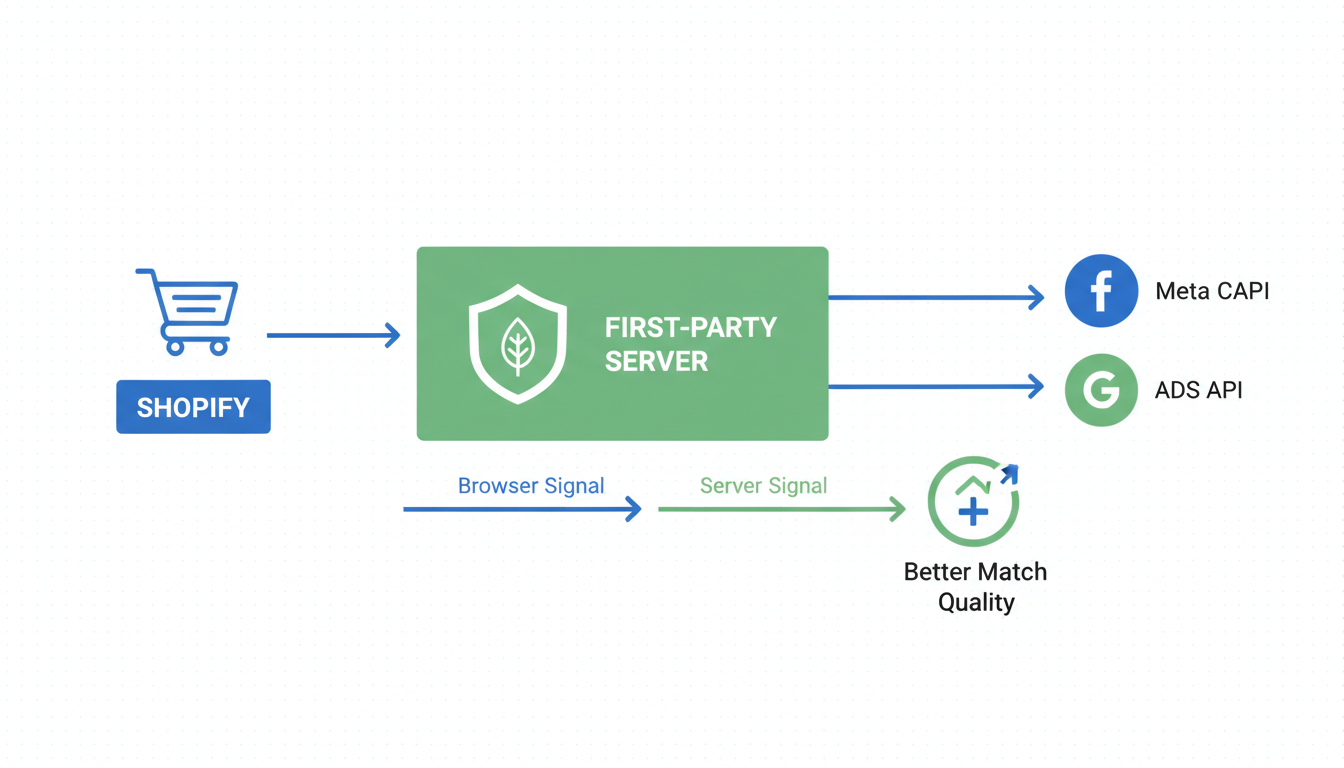
Shopify server-side tracking is the difference between an algorithm that scales budget cleanly past $50k a month and one that wobbles every time you raise daily spend. Browser-only setups in 2026 lose 40 to 55% of attributable signal because Safari, Firefox, and the iOS in-app browser all strip third-party cookies inside 7 days, and Meta's algorithm reads that gap as low intent. The fix is not always a $250-a-month server-side GTM stack. Stores under $20k a month in ad spend get most of the lift from Shopify's native Facebook and Instagram channel, which already runs server-side events for the four core conversions. Above $100k a month, custom event coverage and payload enrichment usually justify Stape or self-hosted ssGTM. The math in the middle depends on how many custom events you fire and how messy your stack already is. The walkthrough below shows where the line sits, what each option actually fixes, and the migration path that does not break attribution mid-flight.
- Native channel covers Purchase, AddToCart, ViewContent, InitiateCheckout. Done right, that is 80% of signal.
- Stape and ssGTM matter for custom events, payload enrichment, and multi-platform routing.
- Cost-benefit flips around $50k to $100k a month in ad spend, not before.
- Migrate in deduped parallel for 14 days. Never cutover cold.
What server-side tracking actually does on Shopify
Shopify server-side tracking sends conversion events from your store's backend straight to ad platforms (Meta, Google, TikTok), instead of relying only on the browser pixel firing in the visitor's tab. The browser pixel still runs. The server side runs in parallel, sends the same events from a place browsers cannot block, and the platform dedups them with a shared event ID. What this fixes is signal loss. Apple's ITP, Firefox's ETP, and the iOS 18 in-app browser all clear or block third-party cookies inside 7 days, sometimes inside 24 hours. A user who clicks an Instagram ad Monday and buys Friday looks like direct traffic by the time the purchase fires. The browser pixel either misses the conversion or attributes it wrong. Server-side does not have that problem because it runs from your origin, with first-party data, after checkout.
The short version: server-side tracking is not a "nice extra" for stores running paid traffic above $20k a month. It is the only way Meta's Conversions API, Google's Enhanced Conversions, and TikTok's Events API get enough deduped signal to optimize cleanly. Without it, the algorithm reads roughly half the picture and spreads delivery across worse audiences to keep budget moving. That is where the wobble comes from. ROAS looks fine for two weeks, then collapses in five days because the platform finally gives up learning from broken signal. Google's server-side tagging docs explain the protocol, and Meta's Conversions API reference is the authoritative source on the Meta side.
When the Shopify F&I app is enough and when it isn't
Shopify's Facebook and Instagram app handles server-side events for the four core conversions: Purchase, AddToCart, ViewContent, InitiateCheckout. For most stores under $20k a month in Meta spend, this is genuinely enough. The F&I app sends server events through Meta's Conversions API, dedups against the browser pixel automatically, and passes hashed customer data when you enable Maximum data sharing. EMQ usually lands between 7.8 and 9.0 if the rest of the stack is clean.
Where it stops being enough:
- Custom events. F&I does not handle Lead, StartTrial, post-purchase upsells, or any custom conversion fired from a third-party app. Quiz signups, subscription trials, thank-you-page upsells, all silently missed.
- Multi-platform routing. F&I sends to Meta only. If you also need server-side events to Google, TikTok, Pinterest, Klaviyo, or Snap, you need a second pipeline. Running 5 separate plugins is how stacks get unstable fast.
- Payload enrichment. F&I sends Shopify's default payload. If you want cart contents at ViewContent, category-level signals at AddToCart, or customer LTV at Purchase, you need a layer that transforms payload before it leaves your origin.
- Self-hosted control. Compliance setups (HIPAA-adjacent, EU-strict GDPR) need every event to leave from a domain you control. F&I cannot do this. Self-hosted ssGTM can.
If none apply, stop here. The native channel is fine. Most stores burn $200 to $500 a month on Stape because somebody told them they needed it, when F&I would have done the job for $0.
Three options: native channel, Stape, self-hosted sGTM
The realistic option set for shopify server side tracking in 2026 is three paths, ranked by complexity and cost.
Option 1: Shopify F&I app + native CAPI (Free)
Setup: 30 minutes. Recurring cost: $0. Covers: Meta only, four core events, Shopify's standard payload. Best for stores under $20k a month in Meta spend with no custom event needs. The thing most stores actually need.
Option 2: Stape (Managed server-side GTM, $20-$300+ a month)
Setup: 4 to 8 hours for a clean implementation. Recurring cost: starts at $20 a month, climbs fast above 1M events a month. Covers: every major ad platform (Meta, Google, TikTok, Pinterest, Klaviyo, Snap), custom events, payload enrichment, hosted on Stape's infra. Best for stores between $50k and $300k a month in ad spend that need multi-platform routing and custom events but do not want to manage cloud infra. Stape's Shopify docs are honest about what it handles.
Option 3: Self-hosted server-side GTM ($60-$200 a month + dev time)
Setup: 12 to 30 hours for an experienced GTM dev. Recurring cost: GCP or AWS hosting, usually $60 to $200 a month for a mid-size Shopify store. Covers: everything Stape does, plus full cloud control, custom domain endpoints, and any custom server-side tag. Best for stores above $300k a month, HIPAA or EU compliance constraints, or custom checkout extensions emitting non-standard events.
The trap most stores fall into is jumping straight to Option 2 or 3 because the agency they hired sells one of them. We see this weekly in audits. A $25k-a-month store running Stape, paying $80 a month, getting roughly the same EMQ as the free F&I app. Sometimes worse, because the Stape setup also sends a duplicate server-event stream that nobody disabled in F&I, and now Meta sees double Purchases on every order.
Cost-benefit at $20k, $100k, and $500k a month
The math on whether server side tagging on Shopify pays for itself depends on three numbers: monthly ad spend, number of custom events, and how broken the current setup is. Here is what the audit-sample data looks like across the 40-ish stores we review each month.
At $20k a month in ad spend:
Native F&I delivers EMQ around 8.0 to 8.7 if configured correctly, which gets ROAS into the 2.8 to 3.4 range on Advantage+ Shopping. Adding Stape or ssGTM might push EMQ to 9.0, lifting ROAS by 8 to 12% on a good week, roughly $1,600 to $2,400 of incremental revenue a month. Stape runs $20 to $40 a month at this volume, plus 6 hours of setup at $150/hour. Payback: 3 weeks if everything goes well, never if the setup goes sideways. Verdict: skip it. Run F&I cleanly. Spend the setup money on creative.
At $100k a month in ad spend:
Native F&I hits the same EMQ ceiling, but missing custom events start to matter. A subscription store firing StartTrial, or a quiz funnel firing Lead, leaves real money on the table without server-side coverage. Adding Stape or ssGTM lifts blended ROAS by 12 to 18%, roughly $12k to $18k of incremental revenue a month. Stape runs $80 to $150 a month at this volume. Payback: under a week. Verdict: do it. Stape is the operator-friendly default. Self-hosted only if you have a dev who has shipped ssGTM before.
At $500k a month in ad spend:
Both Stape and ssGTM make sense, the choice is mostly about control. Stape at $300+ a month is fine if you do not want to maintain cloud infra. Self-hosted at $150 a month plus a few hours of monthly dev time gives you faster custom tag iteration and a custom-domain endpoint, which matters for cross-subdomain tracking and custom checkout extensions. Lift over native-only at this scale is 15 to 25% blended ROAS, more if the pre-migration setup was leaking badly. Verdict: server-side is mandatory at this scale, format depends on internal capacity.
The pattern: under $50k a month, native F&I covers it. Between $50k and $200k, Stape pays for itself. Above $200k, the question shifts from "should we" to "Stape or self-hosted." Stores paying for SSGTM at $15k-a-month spend are usually being upsold by an agency earning margin on Stape resale.
The migration path from browser-only to deduped server-side
The most expensive mistake in shopify server side tracking migrations is the cold cutover. An agency turns off the browser pixel Monday, switches on the server-side stack Tuesday, and the algorithm loses two weeks of learning before signal stabilizes. ROAS tanks for 10 days, the client panics, the agency blames "the migration window," nobody writes down the lesson: never cutover. Always run parallel.
The migration path that works:
- Day 0: Audit current state. Open Meta Events Manager, screenshot the EMQ score, the 7-day event volume, and the diagnostics tab. Note which events fire browser-only vs server. Without this baseline you cannot tell whether the migration helped or hurt.
- Days 1-3: Stand up the new pipe in test mode. Whether that is enabling F&I CAPI, configuring Stape, or deploying ssGTM, do it in test mode first. Use Meta's
test_event_codefield. Validate that test events arrive deduped against the browser pixel. - Days 4-7: Run parallel in production with deduplication. Both browser pixel and server-side events fire on every conversion, sharing the event ID. Watch Events Manager for duplicates. If you see two rows for Purchase without a "deduplicated" note, your event ID setup is broken.
- Days 8-14: Hold parallel, watch EMQ. EMQ is a rolling 7-day average, so it takes a full week to stabilize. Do not change anything in this window. If EMQ climbs above baseline by at least 1.0 point and event volume holds steady, the migration is working.
- Day 15+: Leave the browser pixel ON. Browser + server is how the dedup system is designed to work. Turning off the browser pixel costs you the fingerprint signals (cookie, user agent, client-side IP) that lift EMQ above 8.
That last step is where most migration guides go wrong. They tell you to disable the browser pixel "to avoid duplicates." Duplicates only happen when event IDs are mismatched. Run both, dedup with a shared event ID, and EMQ ends up 1.5 to 2 points higher than server-only.
Common failure modes we see in audits
These are the failure modes we see in roughly 7 out of 10 Shopify audits. If you recognize more than two on this list, your tracking is leaking enough signal to explain whatever ROAS instability you are currently blaming on creative.
- Two server-side pipes running in parallel without coordination. Stape sending CAPI events, F&I app also sending CAPI events, no shared event ID. Meta sees double Purchases. Reported ROAS reads 50 to 80% above real. Algorithm learns from ghost conversions.
- Server-side events routed through GA4 instead of CAPI. Some legacy ssGTM templates default to GA4 server endpoints, which send event data to Google Analytics first and only forward to Meta as a secondary call. EMQ caps around 5 because customer match keys get stripped in transit.
- Missing event ID on the server-side Purchase event. Browser pixel fires
event_id: order_1001, server fires no ID at all. Meta cannot dedup. Both events count, ROAS lies, algorithm optimizes against inflated numbers. - Stape sending events but Maximum data sharing not enabled in F&I. This one is sneaky. The Stape pipe sends rich payloads, but the F&I pipe is also still on, sending Standard-data-sharing events that strip email and phone. Meta sees inconsistent customer data across the two pipes and downgrades EMQ on both.
- ssGTM container deployed but DNS not pointed at the custom domain. The tag config routes through
gtm.your-store.com, DNS still points atgoogletagmanager.com. Browser blockers (uBlock, AdGuard, Brave shields) catch the calls. Roughly 18 to 25% of Shopify traffic in 2026 runs some kind of blocker. - Test event code left in production for weeks. Somebody set
test_event_code: TEST12345during validation, forgot to remove it. Meta routes those events to the test queue, where they do not count for optimization. - Theme-level pixel snippets nobody removed. Old
fbq('init', 'OLD_PIXEL_ID')calls still living intheme.liquidfrom a 2022 setup. Two pixel IDs firing, server-side events deduping against the wrong one.
The audit pattern: open Events Manager, go to Diagnostics. Warnings about duplicate events, mismatched IDs, or missing parameters are the leaks. Fix them before adding any new tracking layer. Adding Stape on top of a broken stack just gives you a more expensive broken stack.
What server-side tracking does NOT fix
Server-side tracking gets sold as a cure for everything. It is not. Here is what it does not fix, no matter how clean the implementation.
It does not fix bad creative. If CTR is below 0.8% on cold prospecting, the algorithm cannot rescue tired creative with better signal. Server-side tells Meta who converted, not what made them convert.
It does not fix a broken offer. Stores with a $79 hero product and $12 shipping in a category where $89 free shipping is standard will not see a ROAS lift from server-side tracking. The offer is the constraint. Tracking just measures it more accurately.
It does not fix attribution model confusion. If Meta reads ROAS 4.2 but Triple Whale reads 2.1, server-side does not resolve the gap. The systems use different attribution windows and different click-vs-view weighting. Server-side improves Meta's accuracy, not the reconciliation between platforms.
It does not fix slow site speed. Stape adds an extra HTTP call to checkout, ssGTM adds at least one. If checkout already takes 5+ seconds, the server-side stack adds maybe 200ms more. Not catastrophic, but not nothing. Fix Core Web Vitals first if you are already on the edge.
The honest framing: server-side tracking fixes signal loss caused by browser restrictions. The lift is real for stores spending real money on ads. But it is one input into ROAS, not the whole engine. Treat it like brakes on a car. You need them. They do not make the car go faster.
Frequently asked questions
Do I need Stape or ssGTM if Shopify's native channel works?
Will server-side tracking break my existing browser pixel?
How long does a Shopify server-side tracking migration take?
What is the difference between Stape and self-hosted ssGTM?
Can server-side tracking help with iOS 18 attribution loss?
Does server-side tracking improve organic Shopify reporting too?
Shopify server-side tracking is one of those decisions where the right answer depends entirely on where you are. Under $50k a month in spend, the F&I app does the job and Stape is overhead. Between $50k and $200k a month, Stape pays for itself inside two weeks. Above $200k, the question is just managed vs self-hosted, not whether to migrate. The mistake we see most often is paying for tooling that does not match the problem. Best to audit the current EMQ score, the diagnostics tab, and the actual list of custom events you fire before signing up for a server-side gateway. Most "we need ssGTM" conversations end with "actually the F&I app was fine, somebody just never enabled Maximum data sharing." Fix the cheap thing first. Then decide whether the expensive thing is actually next.
Get a full X-ray of your ad account
Paste your Meta and Google Ads. See exactly where signal is leaking. Free. 60 seconds.